

The switch between the grid and the inverter is one of the cheapest parts in the system and one of the few that, when it fails, can burn out everything plugged in. Why we do not install an ATS, how we wire the MTS as a bypass, and why we do not put the whole house on backup.
In a system with backup, the switch that moves the house between the grid and the inverter is one of the cheapest parts in the whole assembly. It is also one of the few that, when it fails, can take everything plugged into the house with it. Worth five minutes before you choose one.
What a transfer switch does
A transfer switch sits between two supplies and decides which of them feeds the house. There are two kinds, and there is only one difference between them:
ATS — Automatic Transfer Switch. It changes over by itself, with nobody involved, when it detects that one of the supplies has gone.
MTS — Manual Transfer Switch. It changes over only when a person turns it.
Automatic naturally sounds better. With what is on the market today, it is not.
Why we do not install an ATS
We have nothing against the principle. We have a problem with the products. Very cheap ATS units are sold here, and most of the ones we have come across in the field are poorly made. A switch that has to work on its own, for years, with nobody watching it, is precisely the part where saving a hundred lei makes no sense.
The typical way a cheap contactor fails is by welding its contacts: inrush current or repeated arcing fuses the pads together and the switch is stuck in one position. From there two things can happen, and both are ugly.
The one that destroys the inverter
If the contact on the grid side stays closed while the inverter is feeding its backup output, the two supplies end up tied together. A hybrid inverter's backup output is not made to run in parallel with the grid — it is an independent source with its own waveform. The best case is a burnt inverter.
The one that destroys the house
Many cheap switches break the neutral too, not just the phases. If the neutral pad stops making contact — welded in the wrong position, burnt, or simply worn — while the phases stay live, the installation remains energised but with no neutral reference.
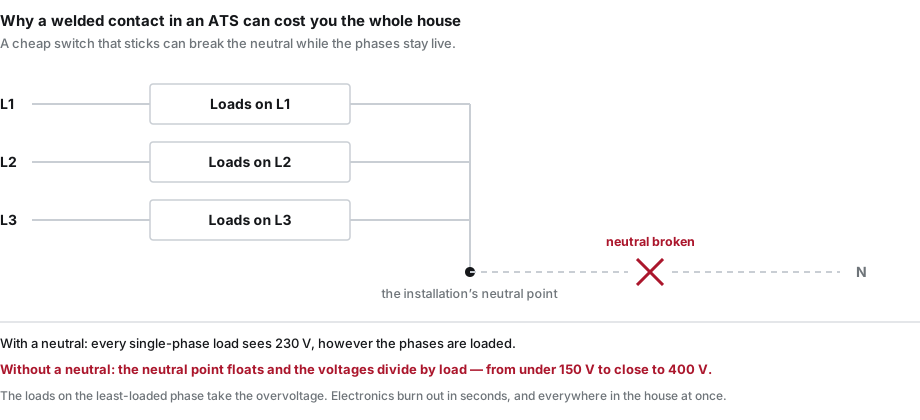 Neutral broken: the voltage on single-phase loads is no longer 230 V but whatever the phase loading makes it.
In a three-phase installation the neutral is the point each phase measures its 230 V against. When it goes, that point floats: loads on different phases end up effectively in series between phases, and the 400 V between those phases divides between them by impedance. The most heavily loaded phase drops, the least loaded one rises — and can approach 400 V.
In practice: the room where you left a lamp on takes the voltage the room with the air conditioning is not using. The television, the router, the boiler, the fridge, the chargers — everything with electronics in it burns out within seconds. And not one appliance, but half the house at once.
That is why we do not install an ATS. Not because automation is wrong in principle, but because the risk bears no relation to what you save.
What we install instead: an MTS as a bypass
We install an MTS, and we install it in a particular way: as a bypass for the whole inverter assembly, wherever the system has backup.
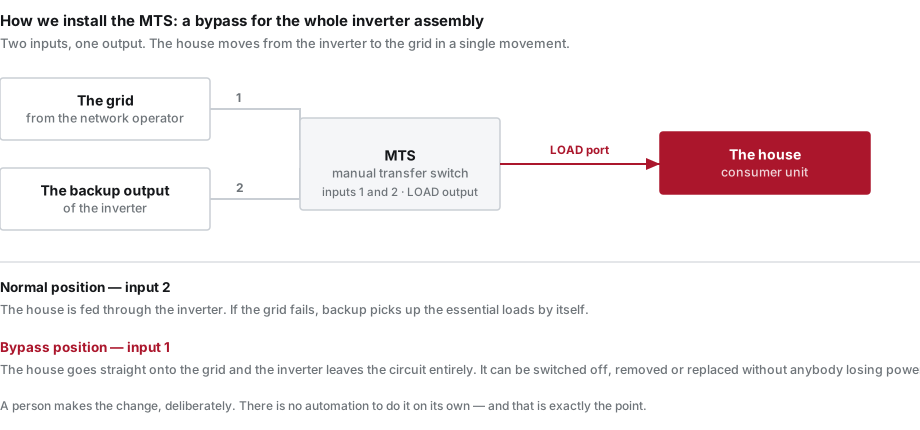 Two inputs, one output. The house is on the LOAD port; the inputs are the grid and the inverter's backup.
The wiring is simple and reads straight off the diagram: the house is connected to the MTS load port, and its two inputs are the grid and the inverter's backup output. In normal operation the switch sits on the inverter. When needed, you turn it to the grid and the inverter leaves the circuit entirely.
Why a bypass matters when the inverter already has backup
Because backup covers the grid failing, not the inverter failing.
If the inverter itself stops — an error, a part to replace, a failed update, a planned visit — everything that passes through it stops with it. Including the loads you put on backup precisely so they would never be without power. Without a bypass, the house waits for the part.
With an MTS you switch to the grid in seconds, the house carries on as it did before the PV system, and we can work on the inverter without pressure. For somebody with a boiler or a well pump, the difference between "we wait two days for the part" and "we wait two days for the part, but with power in the house" is everything.
Essential loads: what they are and why we choose them
Essential loads are the circuits that have to keep running when there is no power from the grid. Not everything in the house — only what actually matters for as long as the cut lasts.
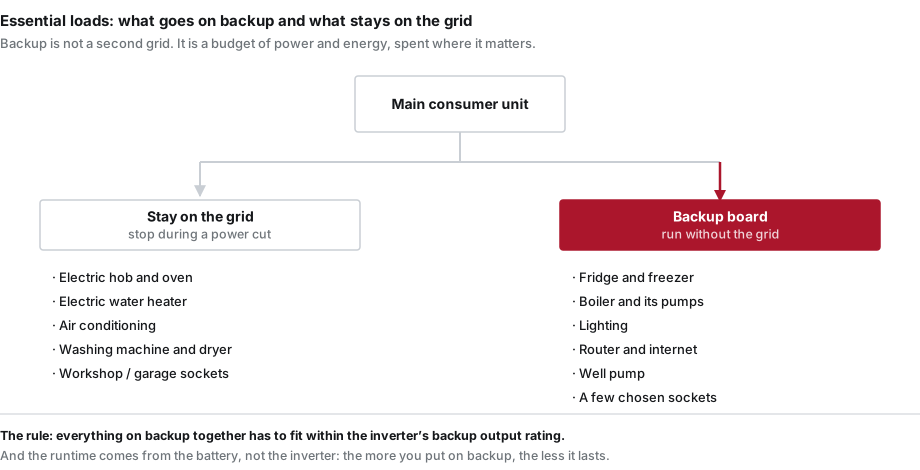 The backup board is a selection, not a copy of the main consumer unit.
In an ordinary house, backup gets: the fridge and freezer, the boiler and its pumps, the lighting, the router, the well pump and a few chosen sockets. Staying on the grid: the electric hob and oven, the electric water heater, the air conditioning, the washing machine, the workshop sockets.
Why we do not encourage putting the whole house on backup
Because it is not a second grid. It is a budget, and it has two different limits.
The first limit is power. An inverter's backup output has a maximum rating, usually lower than its nominal power. Put the whole house on it and it only takes the water heater starting while the hob is on for the output to trip on overload — which is to say, exactly when you need it. What was meant to be security becomes a source of extra outages.
The second limit is energy, and that comes from the battery, not the inverter. Runtime divides by what you draw. A fridge, a boiler and a few lights will keep a battery going all night. An electric water heater empties it in an hour and a half — and in the morning, when light and heating would actually have been useful, there is nothing left.
There is a cost argument too: wiring a separate backup board costs less than doubling the battery capacity to carry loads that, honestly, can wait three hours.
How we decide what goes on backup
On site, with the board open and a list. The question is not "what would you like to keep running" but "what does it cost you if it stops for three hours". The answer is almost always shorter than people expect — and far cheaper to build.
If you already have a system with backup and do not know what is on it, or you are considering an ATS you have seen cheap online, write to us through the support form and we will look at it together. Other common questions about equipment are on the frequently asked questions page.